How to Claim Your Business on ChatGPT
Yes, you can claim your business on ChatGPT if you are eligible. OpenAI opened Business Hub in beta on November 10, 2026. Sign in to ChatGPT, open Business Hub, search for your listing, and verify that you represent the business. Claiming lets you update your details. It does not guarantee more recommendations.
Mid Michigan Interactive helps local businesses in Lansing and across Michigan with AI search optimization, including the ChatGPT claim process, OAI-SearchBot access, and the website and schema work that makes a business easier to cite.
Can you claim your business on ChatGPT?
Yes. OpenAI's Business Hub lets eligible businesses claim an existing ChatGPT business profile, or in some cases add one, and then manage that information. You must own the business or be authorized to represent it. You do not need a ChatGPT Ads account or a ChatGPT Enterprise agreement.
Eligibility depends on industry, location, and OpenAI's verification checks. OpenAI says claiming is initially available to eligible businesses with a website. OpenAI's setup guide also says local stores and restaurants can currently claim only an existing U.S. listing. Eligibility can change, and OpenAI may decline a request when a business raises safety or integrity concerns.
How do you claim your business on ChatGPT?
To claim your business on ChatGPT, sign in to ChatGPT, open Business Hub from the sidebar, and search for your business by name. Then complete the verification steps OpenAI offers for that listing:
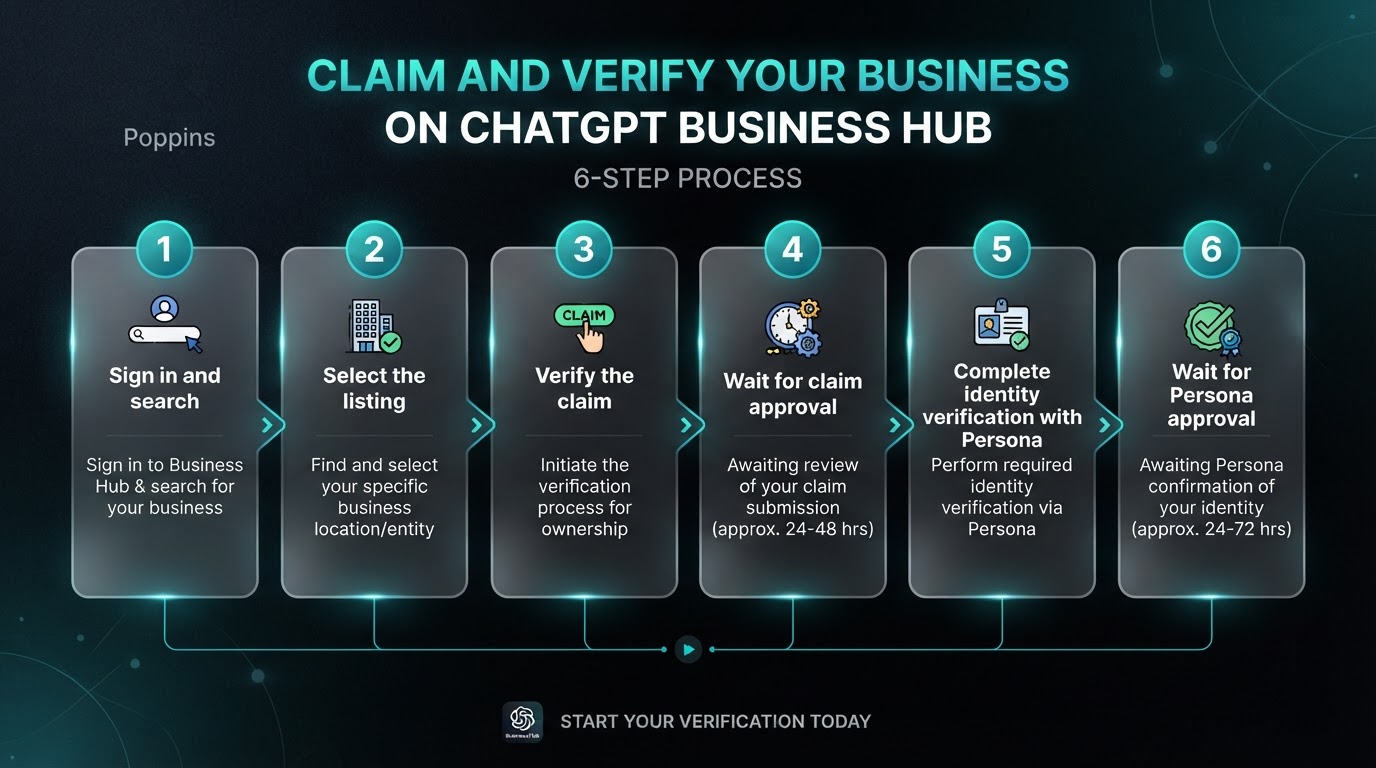
- Sign in and search. Sign in to ChatGPT, open Business Hub from the sidebar, and search for your business by name.
- Select the listing. Choose the matching listing and confirm the ChatGPT account you will use to manage it.
- Verify the claim. Use a method shown: business phone (text or automated call), business email, website domain (a DNS TXT record), or a connected Shopify store.
- Wait for claim approval. OpenAI emails its decision or a request for more information. You can cancel the claim while it is under review.
- Complete identity verification with Persona. OpenAI may ask for a government-issued ID, business registration information, and proof that you are authorized to represent the business.
- Wait for Persona approval. Only then can you publish changes, view insights, connect a product feed, or create an eligible Business Agent.
Claiming the listing is not the same as getting the verified badge. OpenAI says the blue check appears after Persona verification is approved, not after the claim alone.
If the listing is already claimed, open its profile, use the more options menu, and choose Dispute ownership. You will still need to verify with Persona. OpenAI says this does not, by itself, change how visible the business is in ChatGPT. If you received a claim invitation, open the personal link in that email and sign in with the same address. Do not forward a personal claim invitation to give someone else access.
What if you cannot find your business in Business Hub?
If you cannot find your business, OpenAI says an eligible online business may see an option to add it. Local stores and restaurants can currently claim only an existing U.S. listing. If no listing appears, keep your website and public facts accurate, allow OAI-SearchBot, and check Business Hub again later. Mid Michigan Interactive can help a Lansing or Michigan business review that setup. If the screen says to contact support, OpenAI says the listing is locked; use that prompt to request help with access.
Does claiming your business make ChatGPT recommend you more often?
No. OpenAI says claiming lets you manage the information you provide about your business. It does not guarantee increased visibility, higher placement, or sales, and it does not give you control over ChatGPT's independent recommendations. Advertising also does not influence those independent answers.
Once Persona verification is approved, you can update details such as your website, description, category, logo, and policies, and view Insights for the past 28 days once activity meets OpenAI's thresholds. Retailers can connect a product feed with pricing and availability. Connecting a feed does not guarantee that ChatGPT recommends your products. Eligible ecommerce and online service businesses in the United States can also create a Business Agent. OpenAI reviews and publishes profile changes, and ChatGPT may still use other sources.
Where does ChatGPT get business information?
ChatGPT can use the details you provide in Business Hub after your claim and verification are approved. OpenAI also says ChatGPT may use other sources when it answers questions about your business, and that profiles may include information from other sources. OpenAI has not published a complete public list of those sources.
| Source or action | What OpenAI says it does | How to claim or update it |
|---|---|---|
| ChatGPT Business Hub | Lets eligible businesses update key details and, after verification, view insights | Sign in to ChatGPT, open Business Hub, claim the listing, and complete Persona verification |
| Your website, crawled by OAI-SearchBot | Surfaces websites in ChatGPT search results | Allow OAI-SearchBot in robots.txt and in any firewall or host rules |
| Product feed (retailers) | Shares product details, pricing, and availability | Connect a feed after claim and Persona approval. Shopify merchants can connect a store feed |
| Other sources ChatGPT may use | OpenAI says ChatGPT may also draw on other sources in answers | Keep your name, address or service area, hours, phone, and website consistent on your site and major public listings |
A complete Google Business Profile still matters for Google AI Overviews and Maps. Google's AI optimization guide says Business Profiles can help products and services be visible in AI responses. That is Google's guidance for Google, not a statement from OpenAI that ChatGPT reads the Google profile. Mid Michigan Interactive still treats a complete, accurate profile as essential, and matches those facts on the website and in schema.
How do you let ChatGPT search crawl your website?
Allow OpenAI's search crawler, OAI-SearchBot, in your robots.txt file and in any firewall, CDN, or security plugin that might block it. OpenAI's crawler documentation says OAI-SearchBot is used to surface websites in ChatGPT search features. Sites that opt out will not be shown in ChatGPT search answers, though they can still appear as navigational links.
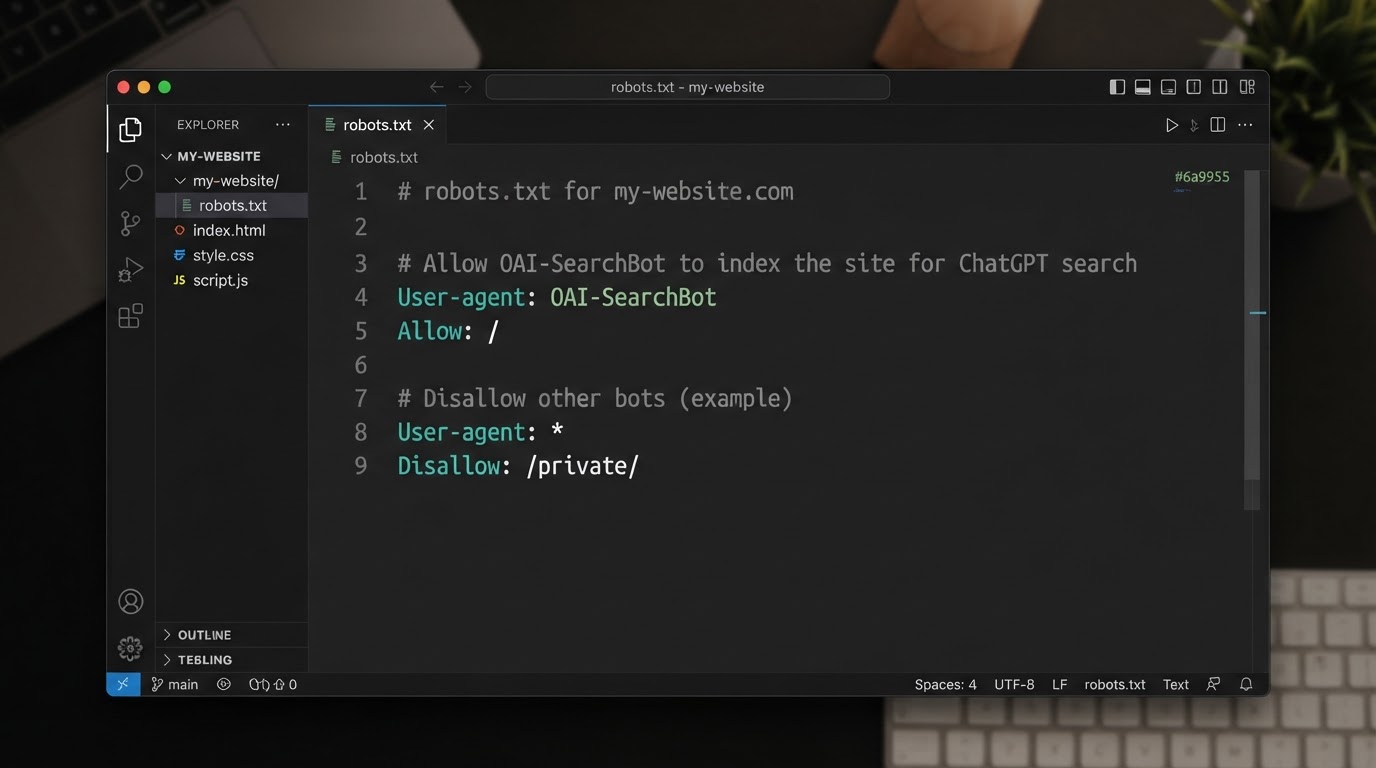
OAI-SearchBot and GPTBot are separate. You can allow OAI-SearchBot so your pages can appear in ChatGPT search, while blocking GPTBot if you do not want that content used to train OpenAI's foundation models. OpenAI says a robots.txt change can take about 24 hours to take effect. Mid Michigan Interactive checks both robots.txt and those extra blocks for Michigan businesses.
What is a ChatGPT Business Agent, and do you need one?
A Business Agent is an optional, clearly labeled ChatGPT chat, separate from ChatGPT's own answers, that can explain a business's products and policies using information the business provides. You do not need a Business Agent to claim your profile or to appear in ChatGPT answers.
Business Agents are currently available to eligible ecommerce and online service businesses in the United States that have a website and meet OpenAI's industry rules. Verification alone does not guarantee agent eligibility. A published agent cannot currently complete purchases, make bookings, or check a customer's order. It can explain offerings and link to the website, where the customer finishes those steps. Shopify is not required.
How can Mid Michigan Interactive help you claim your business on ChatGPT?
Mid Michigan Interactive, based in Lansing, Michigan, helps local businesses claim and support their ChatGPT presence as part of its local SEO and AI search optimization (AEO and GEO) work.
- Review how you already show up. Mid Michigan Interactive checks whether a ChatGPT listing exists to claim and how the business is described today.
- Guide the claim and verification. The owner completes Persona identity checks. After the admin claims the profile, the admin can grant Mid Michigan Interactive agency access, using each person's own ChatGPT account.
- Open the site to OAI-SearchBot. Mid Michigan Interactive checks robots.txt, firewall, and hosting rules so ChatGPT search can crawl the pages.
- Match the facts everywhere. The website, LocalBusiness, Service, and FAQ schema, and the Google Business Profile should use the same name, hours, services, and service area.
- Write answer-first pages. Service pages should name the business, the service, and the Michigan cities served, so ChatGPT and Google have clear facts to cite.
When you claim your business on ChatGPT, you take a real, official step, not a ranking guarantee. The businesses that benefit most also keep a crawlable website, consistent facts, and clear service pages. Mid Michigan Interactive builds that work into its local SEO and AI search services for businesses in Lansing and across Michigan.
Frequently asked questions about claiming your business on ChatGPT
Do I need to run ads or publish a Business Agent to claim my business?
No. OpenAI says claiming your business, publishing an agent, and advertising are separate steps. After your claim and Persona verification are approved, you can manage your information and use available insights without publishing an agent or running ads. A Business Agent is optional, and only some businesses are eligible to create one.
Can I give an agency access to my ChatGPT Business Hub?
Yes. OpenAI says the admin who claimed the business can add teammates in Business Hub and grant an agency access to manage the business or its agent. Use each person's own ChatGPT account. Do not forward a personal claim invitation. Mid Michigan Interactive can help manage a client's profile after that invitation is accepted.
How long do updates to a ChatGPT business profile take to appear?
OpenAI does not publish a fixed timeline. It reviews and publishes changes, and it says updates can take time to appear in a listing or a generated answer. ChatGPT may also keep using other sources. A saved change does not mean every ChatGPT answer will reflect it right away.
What counts as a mention in ChatGPT Insights?
It depends on the business type. For an online business, a mention counts when ChatGPT references the website, not the brand name alone. For a local business, a mention counts when ChatGPT shows a result for that location, even if nobody opens the listing. A blank metric can mean the reporting threshold has not been met.
Does Mid Michigan Interactive work with businesses outside Lansing?
Yes. Mid Michigan Interactive is based in Lansing and works with businesses across Michigan and nationwide. ChatGPT Business Hub claims, OAI-SearchBot checks, local SEO, and website work can all be done remotely. Visit the Mid Michigan Interactive contact page to start a conversation about your business.
Talk to Mid Michigan Interactive
Ready to claim your business on ChatGPT, or to check whether ChatGPT can already find you? Call Mid Michigan Interactive at (517) 401-6004 or contact Mid Michigan Interactive to review your listing, your website, and the next steps with our team. You can also use the free Website and SEO Audit Analyzer on the Mid Michigan Interactive homepage.